General
Display
Performance
Camera
Battery
Network
Connectivity
Sensors
Other
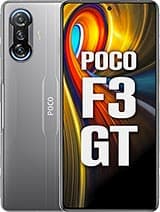
Xiaomi Poco F3 GT Overview
The Xiaomi Poco F3 GT is an Android device from Xiaomi, released in 2021. It combines the Mediatek Dimensity 1200 (6 nm) and a 6.67-inch display, running Android 11. This page tracks its full specifications, root status, and the bootloader and recovery notes that apply to it.
Root the Xiaomi Poco F3 GT
The Xiaomi Poco F3 GT is a 2021 Android device from Xiaomi. It runs the Mediatek Dimensity 1200 (6 nm), a MediaTek platform, flashed via SP Flash Tool on many models with BROM as the deep-recovery path. Shipped software: Android 11, upgradable to Android 12, MIUI 13 for POCO. For this model the realistic path is: the brand-specific unlock described below, followed by Magisk via patched boot image (fastboot). Typical hands-on time is 1–3 hours.
Difficulty
Moderate — brand-specific steps involved
Typical time
1–3 hours
Method
Magisk via patched boot image (fastboot)
Bootloader unlock on Xiaomi
All Xiaomi-family unlocks run through the official Mi Unlock tool with a bound Mi account and a mandatory waiting period (historically 72 hours to 30 days). HyperOS added stricter account eligibility rules; nothing legitimate skips the wait.
Platform notes
MediaTek platforms flash through SP Flash Tool rather than plain fastboot on many models, and expose BROM mode as a deep-recovery path. Correct scatter/firmware matching matters more here than on Snapdragon devices.
Before you start
- Bootloader unlocking factory-resets the device on almost all models — back up everything first.
- Never use the "clean all and lock" option in Mi Flash unless deliberately re-locking on full stock firmware — it is the most common Xiaomi hard-brick cause.
- Anti-rollback protection makes downgrading firmware dangerous on this brand; always flash equal-or-newer versions.
FAQ
Can I root the Xiaomi Poco F3 GT?
Yes. The bootloader must first be unlocked with the official Mi Unlock tool, which requires a bound Mi account and a mandatory waiting period. After the unlock, root is Magisk via patched boot image (fastboot).
Does the Xiaomi Poco F3 GT support custom recovery (TWRP)?
Popular Xiaomi, Redmi and POCO models usually get TWRP or OrangeFox builds — check that one exists for this exact codename. A custom recovery is optional for root: after the Mi Unlock waiting period, Magisk installs by flashing a patched boot image over fastboot.
Will root the Xiaomi Poco F3 GT void my warranty?
Xiaomi will generally treat a rooted Xiaomi Poco F3 GT as outside warranty while it is modified. Restoring full stock firmware before a service visit usually restores normal treatment in practice, and consumer law in some regions (such as the EU) may still cover defects unrelated to root.
What Android version does the Xiaomi Poco F3 GT run?
It runs Android 11, upgradable to Android 12, MIUI 13 for POCO. The specifications table on this page lists the full software details.
Similar Devices

Xiaomi Poco M8

Xiaomi Poco M8 Pro

Xiaomi Black Shark Gaming Tablet

Xiaomi Redmi Turbo 5

Xiaomi Redmi Turbo 5 Max

Xiaomi Watch 5

Xiaomi 17 Ultra

Xiaomi Redmi Note 15